max / Telegram Web ترتيب حسب التفاعلات
 Language:
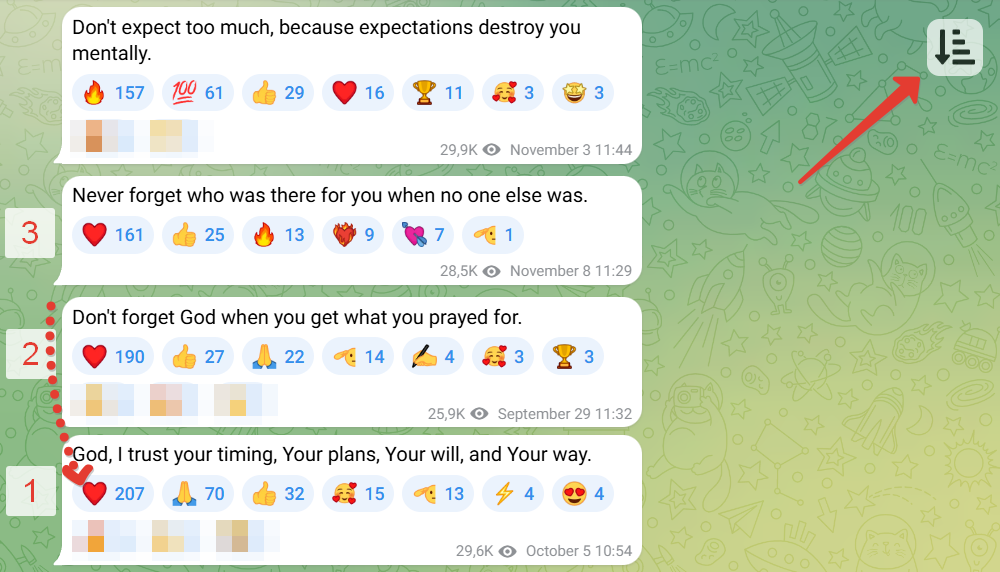
 Sort by reactions. Helps you find messages (posts) with the highest number of reactions (likes) :+1:. The script adds a button to Telegram for sorting messages (up to 80 items).
Instructions
How to install and use:
On a computer (easier)
Installation
- Install the Tampermonkey browser extension.
- Then install the sorting script (green button). Or add the code manually.
Usage
- Open any channel or group at https://web.telegram.org/a/
- Press the
Page Upbutton several times to load more messages. Or use the mouse wheel. But do not use theHomebutton, as not all messages will have time to load. - Click the new button to sort. All messages will be sorted by the number of reactions.
If problems occur — refresh the page.
On mobile devices
Installation
- Install the Lemur Browser (needed because not all mobile browsers allow installing extensions)
- Install the Tampermonkey extension in it.
- Enable developer mode in the browser: open the extensions page
chrome://extensions/and activate the "Developer mode" toggle at the top. - Then install the sorting script (green button)
Usage
- Open any channel or group at https://web.telegram.org/a/
- Scroll to load more messages.
- Click the new button to sort. All messages will be sorted by the number of reactions.
If problems occur — refresh the page.
Rating: 20.7